Pixel art was/ is used in most vintage or retro style games, it took up little memory and made available use of the limited colours game designers could use, for example Mario in Super Mario Bros (1985).
Pixel art works by colouring individual the individual pixels on a canvas to create an image, usually the canvas is small and in a power of 2 (32×32 or 16×16) this means that there is a limited amount of detail the object can have, so you have to think about the individual colour placement of each pixel to make sure you get the desired effect.
Techniques:
There are a few different techniques that an artist can utilise when creating pixel art, these will make sure that the concept is clear, concise and is shaded correctly.
Silhouette:
When starting a pixel art concept draw out the character’s or object’s silhouette, this will show how clear the shape is and if the concept can be determined from just the primitive shape.
Often a simplified design works best for pixel art as there is less space to work with colour and details so design with simple shapes in mind to get the base of the concept.
Colour Palettes:
Gradients can’t be done smoothly in pixel art, due to the small canvas size (usually), so artists will often use designed colour palettes when creating pixel art.
This gives a focussed complimentary colour scheme that will work well in the small canvas and stops the piece from get overcrowded with lots of different colours.
Dithering:
Dithering is a technique used to create shadows and shade areas in a pixel art concept, it makes use of patterns of coloured pixels to gradually darken or lighten areas where it is used.
This can be used to create a more retro or stylised look to a piece and is useful when shading with a limited colour palette.
Shading:
Light and shadows still need to be thought about when creating pixel art, if it is a character and it is animated then the shading and highlights will change depending on their movement.
If there any reflective, bounce lights or shadow caused by lighting in a scene that will also need to be captured.
Anti-Aliasing:
When scaling up or down a piece of pixel art, the edges can become blurred or soft, this is known as anti-aliasing. Basically, you need to be careful when scaling or you might have to recolour parts of your image.
Line Art:
The use of a black border can sometimes make an image look flat; it is more noticeable in pixel art due to the smaller canvas. Therefore, line art is often used, this is where a similar dark colour is used to outline the object or character to give then a softer look and make then look more realistic.
My Work:
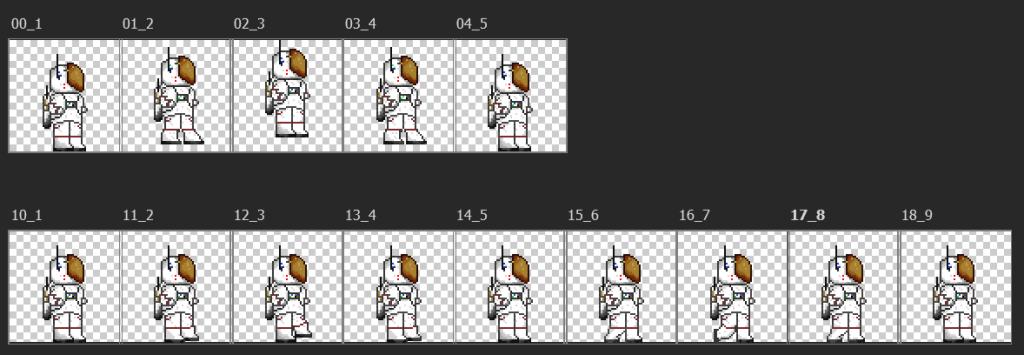
For my Platformer I decided to go with a more retro style and look to the game, I settled on a space theme because I knew the jump mechanic in Unity is more ‘floaty’ then realistic. So, I decided that an astronaut is what I could do for my character.
For the Idle animation I thought it might be cool if he were to float slightly upwards and come back down again giving him a ‘floaty’ feel. I thought the use of the gold for his visor was different to using a light blue and provides a focal point. The green and blue on his chest added some small details to a little control panel for his oxygen pack that I thought would be realistic.
I also created a walk animation that I flipped so when the player moves the character left and right, the character will switch between those animations to look like he is moving left and right.
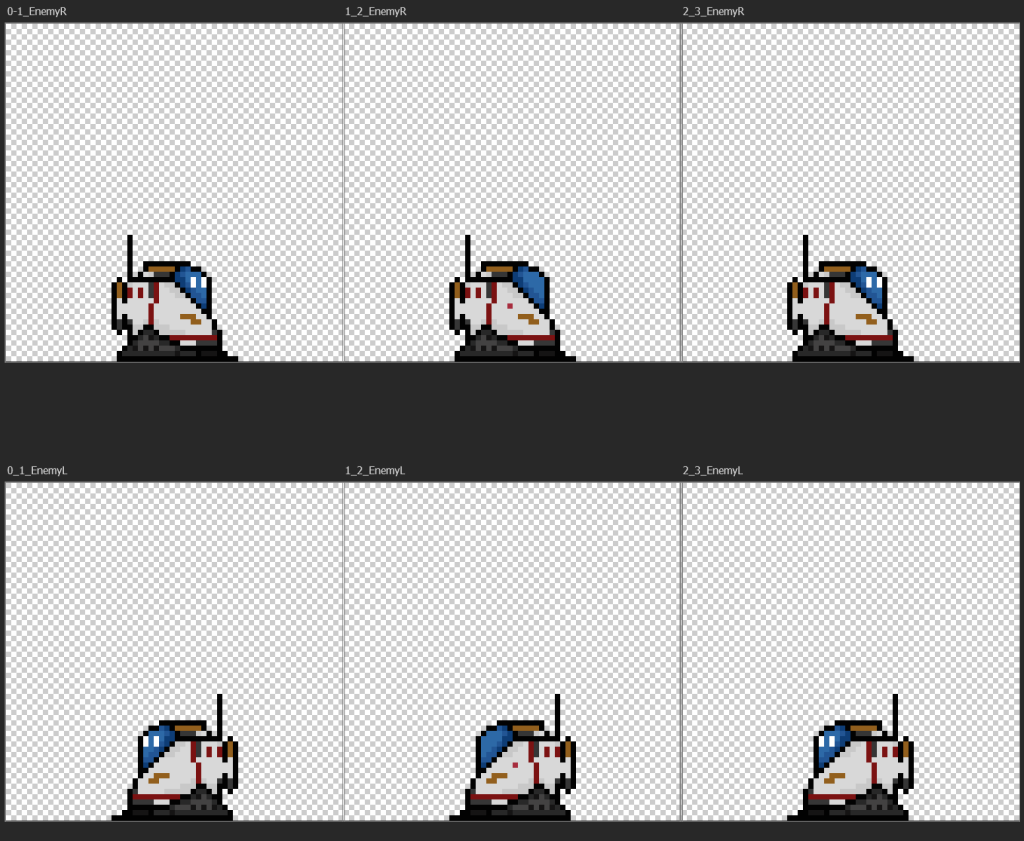
For my enemy character I decided to use the same colour palette as the astronaut. I imported him into this document to get a sense of scale for the robot. the player will have to jump on top of the enemy in order to defeat him, so he had to be small enough so it was possible to do that.
For an idle I had the robot blink and I made sure he would be able to face left and right if I am able to give him a set path to move between in the game.
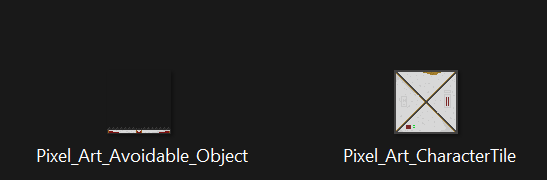
I then moved onto creating the main block and a small avoidable that the player will have to jump over, they use the same colour palette as well as the robot and astronaut and they white will help them standout on the dark background of space in game.
Reflection:
I have done pixel art before but it was nice to go back to it and look at animations and walking cycles for use in a game. I went for the space theme as the jump in Unity can be quite ‘floaty’ so I thought it might make sense to have the player as an astronaut in space as then the ‘floaty’ jump works as a feature rather than something to avoid.
I am quite happy with my designs and the animations I have created, and I would like to use some of the techniques I have learned when creating other 2D games as I really like the retro arcade style that pixel art gives in games.
References:
Redbubble ‘DonatasSab’ (n.d.)Pixel Art Astronaut Print [Print]. Available Online; “Space Astronaut Pixel” Art Print for Sale by DonatasSab | Redbubble [Accessed 1/11/22]
Lee, S. (2021)Pixel Art Planet Image [Photograph] . Available Online; Free 3d Image on Unsplash [Accessed 4/11/22]